Stop Using Your Smartest AI Model for Everything: A Practical Workflow That Saves Time and Tokens
Most developers default to the strongest AI model for every task. Here’s why treating AI models like a specialised engineering team leads to faster iterations, lower token costs, and better software development.

The Mistake I Didn’t Realise I Was Making
For a long time, I thought I was being efficient.
Whenever I opened my GitHub Copilot, I instinctively selected the most capable model available. It didn’t matter whether I was designing a distributed system, writing a React component, fixing a CSS issue, or generating a Git commit message — the same model handled everything.
After all, if it’s the smartest model, shouldn’t it produce the best results?
Technically, yes. Practically, not always. Over time, I noticed three recurring problems:
-
Responses were often far more detailed than the task required.
-
Simple requests took longer than necessary.
-
Token consumption quietly kept increasing.
None of these issues was significant on its own. But together, they created friction throughout my daily workflow.
The turning point came when I stopped thinking about AI models as different versions of the same assistant.
Instead, I started treating them like members of an engineering team.
Your AI Models Are Not One Employee — They’re an Entire Team
Imagine running a software company. Would you ask your Principal Architect to rename variables? Would your Staff Engineer spend the afternoon formatting documentation? Would your Engineering Director write every unit test?
Probably not.
Good engineering teams succeed because everyone has a role that matches their strengths. I realised AI models work surprisingly well under the same philosophy.
Instead of asking one model to do everything, I assign work based on the complexity of the task.
That simple shift changed how I work every day.
My Four-Step Workflow
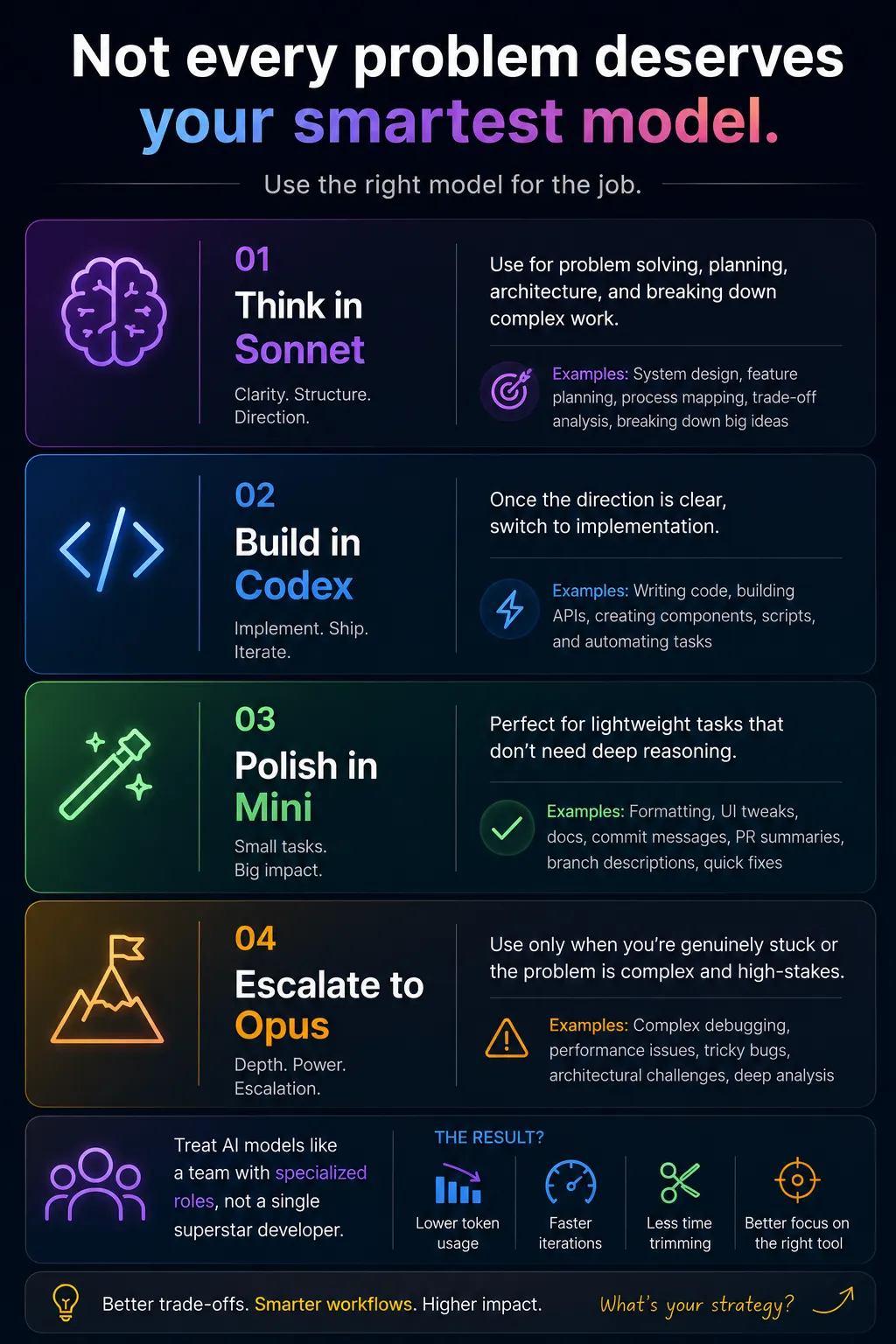
1. Think in Sonnet
This is where I do the heavy thinking.
When I’m trying to understand a problem, compare design options, plan an architecture, decompose a feature, or evaluate trade-offs, I want a model that reasons well and communicates clearly.
Typical tasks include:
-
System design
-
Architecture discussions
-
Feature planning
-
Breaking down complex requirements
-
Technical brainstorming
-
Reviewing implementation approaches
At this stage, I’m not writing code. I’m deciding what should be built.
2. Build in Codex
Once the direction is clear, I switch to implementation. This is where speed matters.
Instead of asking a reasoning-focused model to generate production code, I move to a model optimised for coding tasks.
Typical work includes:
-
React components
-
Backend APIs
-
Python utilities
-
Refactoring
-
Database access layers
-
Unit tests
-
Automation scripts
By separating thinking from implementation, I spend less time rewriting generated code and more time shipping features.
3. Polish in Mini
Not every task deserves deep reasoning. In fact, a surprising amount of software development consists of lightweight work.
Examples include:
-
Tailwind adjustments
-
Documentation edits
-
Git commit messages
-
Pull request summaries
-
Renaming variables
-
Updating comments
-
Small bug fixes
-
Writing release notes
Using a lightweight model for these tasks makes the interaction feel almost instantaneous while keeping token usage significantly lower.
Individually, these tasks are tiny. Collectively, they happen dozens of times every week. That’s where the savings become noticeable.
4. Escalate to Opus
Every engineering team has specialists. You don’t involve them in every decision. You call them when the problem becomes genuinely difficult.
That’s how I think about larger reasoning models. I reserve them for situations like:
-
Complex debugging
-
Performance bottlenecks
-
Difficult architectural trade-offs
-
Multi-system analysis
-
Ambiguous production issues
-
Challenging refactoring decisions
These models are incredibly powerful. But power isn’t the same thing as efficiency.
Using them to generate a simple component is a bit like hiring a Formula One driver to commute through city traffic.
You’ll reach the destination. Just not in the most practical way.
The Biggest Lesson
The mistake isn’t using powerful models. The mistake is assuming every task deserves one.
As engineers, we’re already familiar with choosing the right tool for the job. We don’t use Kubernetes for a personal todo app. We don’t spin up distributed infrastructure for a weekend prototype. We constantly make trade-offs.
AI model selection should follow exactly the same principle.
The Results I’ve Seen
After adopting this workflow, a few things changed.
First, my token consumption dropped without consciously trying to optimise it.
Second, development became faster because I wasn’t waiting for overly detailed responses to simple requests.
Third, I spent less time trimming generated code that solved problems I never asked about.
Perhaps the biggest improvement wasn’t measurable at all. I became more intentional.
Before sending a prompt, I naturally started asking myself:
“What kind of task is this?”
That single question usually tells me which model should handle it.
Will This Workflow Work for Everyone?
Probably not. Different developers have different habits.
Some spend most of their day designing systems. Others primarily write code. Some use AI for documentation. Others rely on it for debugging.
The exact model lineup will also continue changing as new models appear.
That’s why I don’t think this framework is about Sonnet, Codex, Mini, or Opus specifically.
It’s about assigning work based on capability instead of habit.
The names may change. The principal probably won’t.
Final Thoughts
One of the biggest productivity gains in software engineering rarely comes from working harder. It comes from reducing unnecessary friction.
For me, that meant treating AI models less like a single assistant and more like a well-balanced engineering team.
Think with one.
Build with another.
Polish with a third.
Escalate only when the problem truly demands it.
It’s a simple mindset shift, but it’s made my workflow faster, cheaper, and far more deliberate.