Stop Putting UI Inside Your MCP Server: The Abstract UI Schema Pattern
An enterprise architecture pattern for rendering analytics across Copilot, Teams, Claude Desktop, and custom applications without creating client-specific backend code
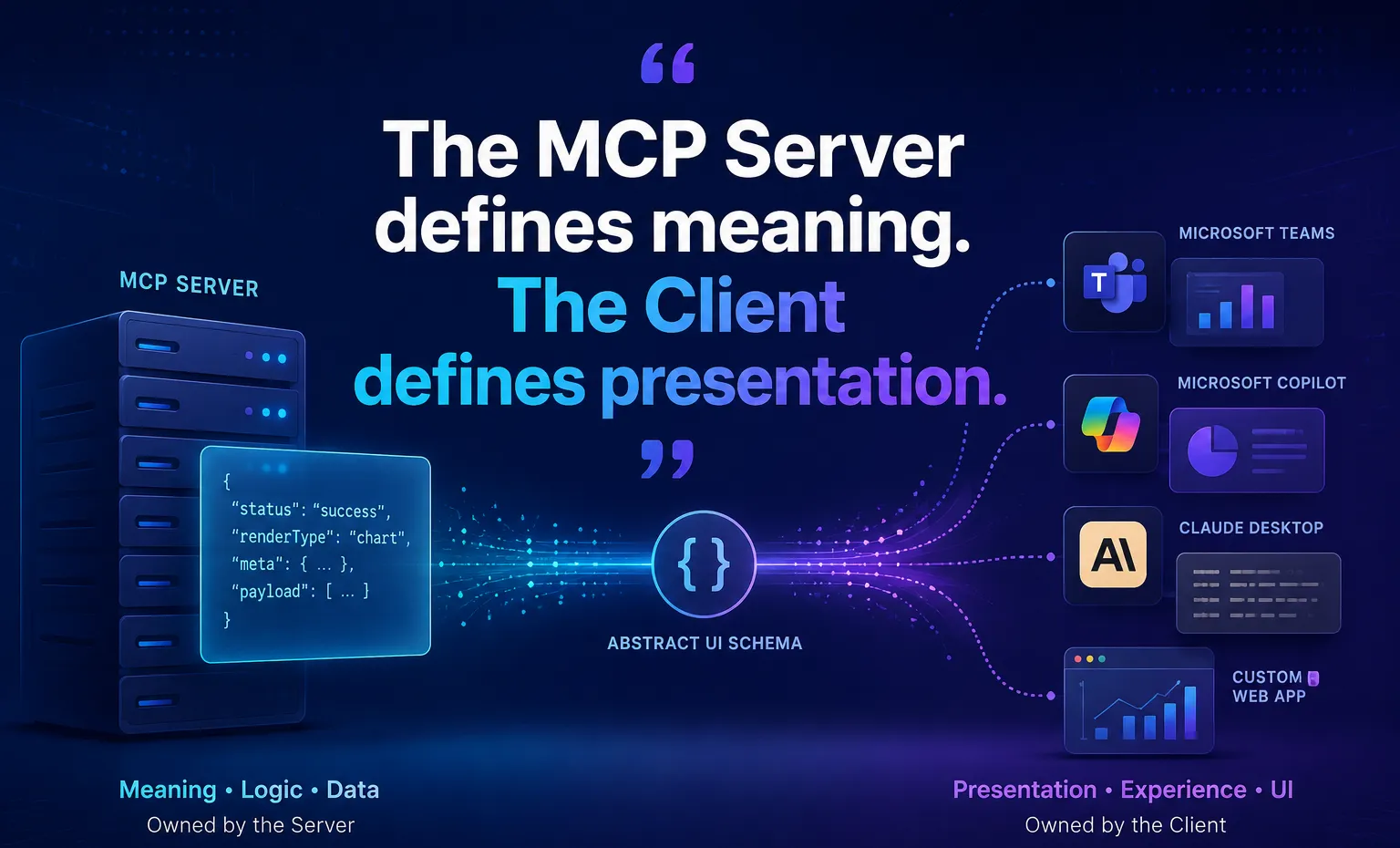
Over the past year, while I was studying, reviewing and building MCP Servers for analytics, reporting, operational intelligence, and business process automation, one architectural problem kept on appearing over and over again.
The MCP Server would successfully fetch data from enterprise systems. The LLM would successfully invoke the tool. The business logic would work perfectly.
And, then everything would fall apart at the presentation layer. A business user would ask:
“Show me the sales trend for the last four quarters.”
The server would return structured data. But then a new question emerged:
How should the data be displayed:
-
MS Teams and Copilot wanted Adaptive Cards.
-
Claude Desktop preferred Markdown.
-
Custom React application wanted charting libraries.
-
And, future clients would undoubtedly want something else.
The natural temptation is to make the MCP Server generate the UI. And, that is exactly where the architectural problems begin.
The Hidden Anti-Pattern in Many MCP Implementations
Many teams start with an architecture that looks something like this:
Initially, this feels efficient until a second client arrives.
Now the server suddenly needs:
-
Adaptive Cards
-
HTML
-
React Components
-
Markdown
-
Mobile Layouts
-
Future visualisation frameworks.
The backend becomes responsible for front-end rendering decisions.
Every new client creates additional complexity. Every UI redesign requires backend changes. Every platform-specific feature leaks into the MCP layer. What started as an integration server slowly transforms into a presentation engine.
That is architectural coupling.
The Architectural Principles Behind This Pattern
While designing enterprise MCP ecosystems, I found that several well-established software architecture principles can be applied directly to MCP implementations.
The result is what I call the Abstract UI Schema Pattern.
This pattern is not an attempt to reinvent architecture. Rather, it extends proven software design philosophies into the rapidly evolving MCP ecosystem.
1. Separation of Concerns (SoC)
One of the most fundamental principles in software architecture is the Separation of Concerns.
In traditional applications:
-
Business Logic belongs in the backend.
-
Presentation Logic belongs in the frontend.
However, many MCP implementations unintentionally blur this boundary by embedding client-specific presentation details directly into tool responses.
The Abstract UI Schema Pattern restores this separation by ensuring:
-
MCP Servers own data, meaning, and business logic.
-
Client Applications own rendering, layout, and user experience.
2. Adapter Pattern
The client-side translation layer is effectively an implementation of the classic Adapter Pattern.
A single abstract MCP response can be translated into multiple platform-specific representations:
-
Adaptive Cards
-
React Components
-
Markdown Tables
-
Future UI Frameworks
without requiring changes to the MCP Server itself.
3. APIs Return Data, Not User Interfaces
Modern REST APIs, GraphQL APIs, and Microservice Architectures generally return data rather than rendered user interfaces.
A backend service returns:
{ "revenue": 1200000 }rather than:
<div class="chart"> ... </div>The Abstract UI Schema Pattern extends this philosophy into MCP ecosystems.
Instead of returning Adaptive Cards, HTML Fragments, React Configuration, or platform-specific visualisation definitions, the MCP Server returns semantic information that clients can interpret and render independently.
The Abstract UI Schema Pattern Architecture
The principle is simple:
The MCP Server defines meaning. The MCP Client defines presentation.
Instead of returning platform-specific UI markup, the MCP Server returns an abstract visualisation contract.
The payload describes:
-
What should be rendered
-
What data exists
-
How the data behaves logically
But, it never specifies:
-
Adaptive Cards
-
React Components
-
HTML
-
CSS
What the MCP Server Returns
Instead of this:
{
    "type": "AdaptiveCard",
      ...
}
the MCP Server returns:
{
  "status": "success",
  "textSummary": "Q3 revenue increased significantly.",
  "renderType": "chart",
  "meta": {
      "type": "bar",
      "title": "Revenue by Quarter",
      "xAxisKey": "quarter",
       "yAxisKey": "revenue"
   },
   "payload": [
      {
          "quarter": "Q1",
          "revenue": 450000
      },
      {
          "quarter": "Q2",
          "revenue": 600000
      }
    ]
}
There is no mention of :
-
Teams
-
Copilot
-
React
-
HTML
-
CSS
The payload is purely semantic.
The Translation Layer
Every client receives the exact same MCP response. Each client decides how to render it.
The MCP contract remains unchanged. Only translators evolve.
The Ownership Boundary
Before diving further, it’s important to understand the architectural boundary this pattern establishes.
This is the most important concept in the entire pattern.
Example 1: MS Teams
The Team adapter converts the abstract schema into Adaptive Card components.
The MCP Server never knows Adaptive Card exist.
That’s a MSTeams concern, not a Server Concern.
Example 2: Custom React Apps
The same payload can drive:
-
Rechart
-
Chart.js
-
Highcharts
-
D3.js
No server changes required. No new MCP tools required. No contract modifications required.
Example 3: Claude Desktop
Claude Desktop cannot render React charts.
Instead, the translation layer degrades gracefully. The same payload can be transformed into:
|  Quarter |  Revenue |
|----------|----------|
|    Q1    | 450000   |
|    Q2    | 600000   |
The same payload still works. The experience changes. The contract does not.
Why This Pattern Scales Better
1. Reduced Token Consumption
UI definitions are surprisingly expensive.
Embedding Adaptive Card structures, HTML blocks, or visualisation instructions inside MCP responses increases payload size significantly.
The abstract contract contains only semantic information.
As a result, it can significantly reduce token consumption by eliminating presentation-specific markup.
The exact reduction varies depending on the complexity of the rendered artefacts and the client ecosystem being supported.
2. Independent Release Cycles
With this pattern, the MCP Contract remains untouched.
Frontend teams and backend teams can evolve independently.
3. Future Client Compatibility
Every enterprise eventually adds new AI clients. Today’s stack might include:
-
Copilot
-
Teams
-
Claude Desktop
Tomorrow it could include:
-
ChatGPT Enterprise
-
Internal AI Portals
-
Mobile AI Assistants
-
AR Interfaces
Design Rules
We should follow these three rules:
Rule #1
For multi-client enterprise ecosystems, I recommend that MCP Servers avoid emitting client-specific UI artefacts.
While there are valid scenarios where a single-client MCP deployment may directly emit platform-specific payloads, enterprise environments typically evolve into multi-client ecosystems.
The moment a second or third client arrives, backend ownership of presentation logic begins to create unnecessary coupling and maintenance overhead.
Rule #2
Most business analytics visualisations can be represented as abstract metadata.
There are exceptions.
Highly specialised visualisations such as:
-
GIS maps
-
CAD viewers
-
3D models
-
Domain-specific rendering engines
may require richer presentation contracts.
However, the vast majority of business reporting, KPI dashboards, trend analysis, and operational analytics can be represented using abstract metadata structures.
Rule #3
Every client should own its rendering strategy.
Rendering belongs to the edge.
Not the core.
When Not to Use This Pattern
This pattern is ideal for:
Analytics
KPI Dashboards
Business Intelligence
Operational Monitoring
Executive Reporting
It may be excessive for:
Simple CRUD Tools
Basic Text Responses
Single-Client MCP Deployments
If you only have one client and never expect another, direct rendering may be perfectly acceptable.
But most enterprise ecosystems don’t stay that simple for long.
Final Thoughts
One lesson I’ve learned is that client diversity grows much faster than backend complexity.
The first client is easy.
The fifth client exposes every architectural shortcut.
The Abstract UI Schema Pattern addresses that challenge by applying established software architecture principles — Separation of Concerns, Adapter Patterns, API-first design — to the world of MCP.
The MCP Server becomes a source of meaning.
The client becomes a renderer of meaning.
And that separation turns out to be one of the most important architectural boundaries in scalable MCP systems.
Because the moment your MCP server starts generating UI, it stops being a protocol server and starts becoming a frontend framework.